Up to 32 connections per file
Volt splits each download into parts, fetches them at the same time, and adjusts to what the server allows.
Volt splits every file into up to 32 connections, picks up exactly where a broken download stopped, and puts a Download button on the videos you watch. For Mac and Windows, with one license for both.
15 days free · Cancel before the trial ends and you pay nothing · Mac and Windows
Download accelerator for Mac and PC
Volt splits each download into parts, fetches them at the same time, and adjusts to what the server allows.
Wi-Fi drops, your computer sleeps, the app quits: Volt picks up from the last byte. Link expired? Click it again on the website and Volt carries on.
Point at a video and click Download. Volt adds the sound when a site sends it separately and saves an MP4 that plays on any Mac or PC.
Chrome, Edge, Brave, Opera and Firefox hand their downloads to Volt. Right-click any link or video to send it too.
Queues with start and stop times. When the last file finishes, Volt can quit, put your computer to sleep or shut it down.
Videos, music, documents, apps and archives each land in their own folder, automatically.
Video downloader for Mac and Windows
Volt notices the videos and sound a page plays. Saving one takes a click, and you get a file that plays on your Mac or PC.
Point at a video and a Download button appears on it. It always picks the video you’re watching, even in feeds that load the next ones early.
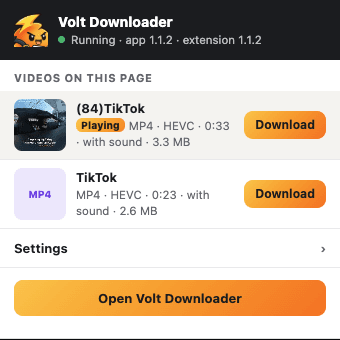
Click Volt in your browser’s toolbar to see what the page played: a picture, the title, the length and the size of each. The one playing now is at the top.
On this page
Studio session — take 2
4:12 · 86 MB
Behind the scenes
1:48 · 34 MB
Product walkthrough
7:05 · 142 MB
Some sites, TikTok among them, send a video’s picture and sound as two separate streams. Volt finds the sound that belongs to the video and puts them back together.
Picture
Sound
One file, sound included
Volt rebuilds streaming videos into ordinary MP4 files without re-encoding, so the quality is exactly what the site sent. On Facebook, Instagram, Reddit and Vimeo it asks for the H.264 version that every Mac and PC plays.
studio-take-2.mp4
86 MB
Streaming playlists (the .m3u8 kind) are saved as a single MP4, sound included. Or right-click any video and choose Download with Volt.
Open video in new tab
Copy video address
Download with Volt
stream/master.m3u8 stream.mp4
Volt doesn’t download from YouTube. It can’t save copy-protected streams such as Netflix or Disney+, or live broadcasts. Please only save videos you have the right to keep.
Browser integration
Add the Volt extension once. From then on, files you download in Chrome, Edge, Brave, Opera or Firefox go to Volt, which speeds them up and files them where they belong.
Automatic. Browser downloads go straight to Volt, and your browser’s own download list stays tidy.
Right-click anything. Download with Volt on any link, image, video or sound.
Signed-in downloads work. Volt uses the site’s sign-in, so files behind a login download too.
Small files stay put. Leave anything under 1, 5 or 20 MB to the browser if you like.
Works with Chrome, Edge, Brave, Opera and Firefox.
Download scheduler for Mac and Windows
Make queues with their own start and stop times and days of the week. Big downloads can run overnight while you sleep.
After the last download, Volt can quit, put your computer to sleep or shut it down, with a 60-second countdown in case you’re still there.
Videos, music, documents, apps, images and archives each go to their own folder.
Cap Volt’s total speed from the menu bar, or slow down one download, so video calls and streaming stay smooth.
Paste a list of links, import them from a text file, or use a pattern like photo[001-100].jpg to add a whole numbered series.
Drop links onto the window or onto the small floating drop target that stays on your screen.
Download every file of a type from a website, such as all its PDFs, or save a whole site to read offline. It follows the site’s robots.txt rules.
See the live speed at a glance, get a notification when files finish, and your computer stays awake until they do.
Safe and private
Every file Volt saves is marked as coming from the internet, so macOS or Microsoft Defender checks it before it opens.
Volt can run each finished file through the antivirus you use (ClamAV, Microsoft Defender and other command-line scanners) and warns you if something is found.
Sign-ins for protected download sites are encrypted by your system: the Keychain on a Mac, Windows’ built-in data protection on a PC.
Volt runs on your computer. It doesn’t send us your downloads, links or browsing. The only thing it checks online is your license, about once a day.
It sends links to the Volt app on your own computer and nowhere else.
Every detail
Three steps
Choose monthly or yearly and start 15 days free. Your license key and the Mac downloads arrive by email right away. The Windows version is coming soon, and your license will work on it too.
On a Mac, open the download and drag Volt into Applications. On Windows, run the installer. Then paste your key; Volt’s settings walk you through adding the browser extension.
Click a download link as usual, or point at a video and click Download. Volt does the rest.
Pricing and trial
[yearly price]/ year
Every feature, on up to [2] computers, Mac or Windows.
Card required. You won’t be charged until day 16. Cancel before then and you pay nothing.
Cancel anytime from your account page; Volt keeps working until the end of the period you paid for. One free trial per person. Payments are handled securely by Polar. [Refund policy in one sentence.]
FAQ
Looking for an IDM alternative on Mac or Windows? Start here.
Try every Volt feature free for 15 days.
Start your 15-day free trialCancel before day 16 and you pay nothing.