
Available
Chrome
Chrome Web Store
Install Volt for Chrome from the Chrome Web Store.
Add to ChromeBrowser extension
Add the Volt extension once. From then on, the files and videos you download go to Volt, which speeds them up and files them where they belong.
Choose your browser
Chrome Web Store
Install Volt for Chrome from the Chrome Web Store.
Add to ChromeEdge Add-ons
Install Volt for Microsoft Edge from the Edge Add-ons.
Add to EdgeFirefox Add-ons
Install Volt for Firefox from the Firefox Add-ons.
Add to FirefoxChrome Web Store
Opera installs it straight from the Chrome Web Store. If Opera asks, add its Install Chrome Extensions helper first.
Add to OperaUsing Brave? Support for Brave is coming soon. Safari isn’t supported yet.
What it does
Automatic. Browser downloads go straight to Volt, and your browser’s own download list stays tidy.
Right-click anything. Download with Volt on any link, image, video or sound.
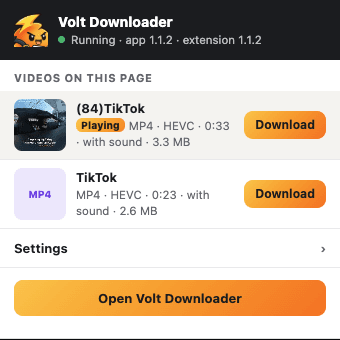
Every video on the page. Click Volt in the toolbar to see what the page played, with the one playing now at the top.
Signed-in downloads work. Volt uses the site’s sign-in, so files behind a login download too.
Small files stay put. Leave anything under 1, 5 or 20 MB to the browser if you like.
Talks only to Volt. It sends links to the Volt app on your own computer and nowhere else.
Set up in a minute
The extension hands downloads to Volt, so get the app first from the Download page.
Add it from your browser’s store below, or follow the steps in Volt’s settings.
Click a download link, or point at a video and click Download. Volt does the rest.